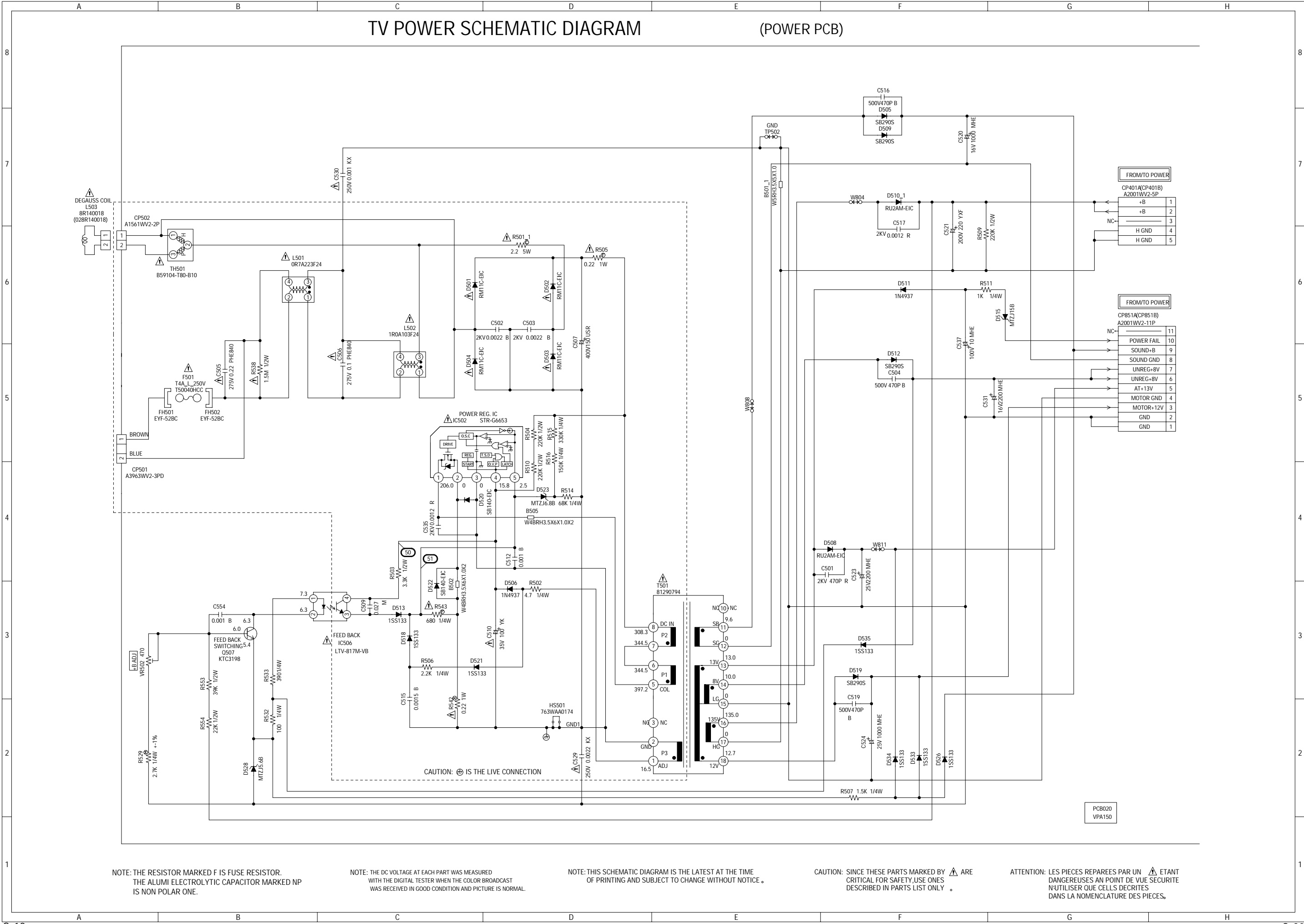
Philips PTV835, PTV836, PTV840, PTV881, PTV842, PTV843, PTV853, PTV854 and PTV855 FULL SCHEMATIC [CIRCUIT DIAGRAM] and waveforms


LEAKAGE CURRENT COLD CHECK
1. Unplug the ac line cord
and connect a jumper between the two prongs of the plug.
2. Turn on the power switch.
3. Measure the resistance value between the jumpered ac plug and all exposed
cabinet parts of the receiver, such as screw heads, antennas, and control
shafts. When the exposed metallic part has a return path to the chassis, the
reading should be between 1 megohm and 5.2 megohms. When the exposed metal does
not have a return path to the chassis, the reading must be infinity. Remove the
jumper from the ac line cord.
LEAKAGE CURRENT HOT CHECK
1. Do not use an isolation transformer for
this test. Plug the completely reassembled receiver directly into the ac
outlet.
2. Connect a 1.5k, 10W resistor paralleled by
a 0.15uF. capacitor between each exposed metallic cabinet part and a good earth
ground such as a water pipe, as shown below.
3. Use an ac voltmeter with at least 5000
ohms/volt sensitivity to measure the potential across the resistor.
4. The potential at any point should not
exceed 0.75 volts. A leakage current tester may be used to make this test;
leakage current must not exceed 0.5mA. If a measurement is outside of the
specified limits, there is a possibility of shock hazard. The receiver should
be repaired and rechecked before returning it to the customer.
5. Repeat the above procedure with the ac
plug reversed. (Note: An ac adapter is necessary when a polarized plug is used.
Do not defeat the polarizing feature of the plug.)
OR
With
the instrument completely reassembled, plug the ac line cord directly into a
120Vac outlet. (Do not use an isolation transformer during this test.) Use a
leakage current tester or a metering system that complies with American
National Standards Institute (ANSI) C101.1 Leakage Current for Appliances and Underwriters
Laboratories (UL) 1410, (50.7). With the instrument ac switch first in the on
position and then in the off position, measure from a known earth ground (metal
water pipe, conduit, etc.) to all exposed metal parts of the instrument
(antennas, handle brackets, metal cabinet, screw heads, metallic overlays, control
shafts, etc.), especially any exposed metal parts that offer an electrical
return path to the chassis. Any current
measured must not exceed 0.5mA. Reverse the instrument power cord plug in the
outlet and repeat the test. See the graphic below.

PRACTICAL SERVICE
PRECAUTIONS
IT MAKES SENSE TO AVOID EXPOSURE TO ELECTRICAL SHOCK. While some
sources are expected to have a possible dangerous impact, others of quite high
potential are of limited current and are sometimes held in less regard.
ALWAYS RESPECT VOLTAGES. While some may not be dangerous in themselves,
they can cause unexpected reactions – reactions that are best avoided. Before
reaching into the powered color TV set, it is best to test the high voltage
insulation. It is easy to do, and is just a good service precaution.
BEFORE POWERING UP THE TV WITH THE BACK OFF (or on a test fixture),
attach a clip lead to the CRT DAG ground and to a screwdriver blade that has a
well insulated handle. After the TV is powered on and high voltage has
developed, probe the anode lead with the blade, starting at the bottom of the
High Voltage Transformer (flyback – IFT). Move the blade to within two inches
of the connector of the CRT. IF THERE IS AN ARC, YOU FOUND IT THE EASY WAY,
WITHOUT GETTING A SHOCK. If there is
an arc to the screwdriver blade, replace the High Voltage Transformer or the
lead, (if removable) whichever is causing the problem.
PICTURE TUBE REPLACEMENT PROCEDURE
Note: a. Two (2) people are required to
handle this picture tube.
b. Safety Glasses must be worn during this
procedure or whenever directly handling a picture tube.
c. Take care in each step not to damage the
CRT or the cabinet.
1. Remove the Chassis and the CRT Socket
Board Module from the cabinet.
2. A furniture pad or blanket should be
positioned on the floor to support only the CRT Face. This pad or blanket
should be high enough to keep the CRT Face approximately 12 to 14 inches off
the floor.
3. Using two people, place the cabinet in a
front down position with the CRT Face on the pad or blanket.
4. Place padded blocks under each corner of
the cabinet to keep it from rocking.
5. Remove the four screws, at the corners of
the CRT.
6. With two people lowering the cabinet to
the floor, leave the CRT elevated by the pad or blanket. Note: Take care not to grasp the neck of the
CRT during this procedure, as it is extremely fragile.
7. Two (2) people may then lift the CRT from
the cabinet.
8. Remove the degaussing coil from the
defective CRT and mount on the replacement. Take care to maintain the exact
shape and fit
MODEL TO CHASSIS LIST

MODEL TO PANEL LIST
For the most current Mode to Panel list, type “CBA” while viewing the exploded
view or schematic. If a list of all modules/panels for all models is desired,
click “CBA/Acc. Parts” while viewing the parts list. A list of these parts can then
be printed.
Remote Cross Reference
For the most current list of remote control part numbers, type “remote” while
viewing the exploded view or schematic. If a list of all remotes for all models
is desired, click “CBA/Acc. Parts” while viewing the parts list.
A list of these parts can then be printed.


Konka KPSL120C2 power supply schematic


Hisense LCD TV power supply schematic


This unit provided with the following SERVICE
MODES so you can repair, examine and adjust easily.
To enter SERVICE MODE, unplug AC cord
till lost actual clock time. Then press and hold Vol (-) button of main unit
and remocon key simultaneously.
The both pressing of set key and
remote control key will not be possible if clock has been set. To reset clock,
either unplug AC cord and allow at least 30 minutes before Power On or alternatively,
discharge backup capacitor.
CONFIRMATION OF USING
HOURS
POWER
ON total hours and PLAY/REC total hours can be checked on the screen.
Total hours are displayed in 16 system of notation.
NOTE: The confirmation of using hours will not be possible if clock has been
set. To reset clock, either unplug AC cord and allow at least 30 minutes before
Power On or alternatively, discharge backup capacitor.
Set the VOLUME to minimum.
Press both VOL. DOWN button on the set and the Channel button (6) on the
remote control simultaneously.
After the confirmation of using hours, turn off the power.
INIT
00 83: Initial setting content of MEMORY
IC.
POWER ON 0010: POWER ON total hours.
PLAY/REC 0003: PLAY/REC total hours.
(16 x 16 x 16 x thousands digit value) + (16 x 16 x hundreds digit value) + (16
x tens digit value) + (ones digit value)


REPLACING OF MEMORY IC
If
a service repair is undertaken where it has been required to change the MEMORY
IC, the following steps should be taken to
ensure correct data settings while making reference to TABLE.
[Initial Data setting
will not be possible if clock has been set. To reset clock, either unplug AC
cord and allow at least 30 minutes before Power On or alternatively, discharge
backup capacitor. No need the setting for after INI 3F.]
Enter DATA SET mode by setting VOLUME to
minimum.
While holding down VOLUME button on
front cabinet, press key 6 on remote control simultaneously.
ADDRESS and DATA should appear as FIG.
ADDRESS is now selected and should
"blink". Using the SET + or - keys on the remote, step through the ADDRESS
until required ADDRESS to be changed is reached.
Press ENTER to select DATA. When DATA
is selected, it will "blink".
Again, step through the DATA using SET
+ or - until required DATA value has been selected.
Pressing ENTER will take you back to
ADDRESS for further selection if necessary.
Repeat steps 3 to 6 until all data has
been checked.
When satisfied correct DATA has been
entered, turn POWER off (return to STANDBY MODE) to finish DATA input.
The unit will now have the correct DATA for
the new MEMORY IC.

Schematic diagram